ID203012: Computer Networks and network programming

This Wiki contains notes written by students in course ID203012 "Computer networks and network programming" at Norwegian University of Science and Technology (NTNU). Wiki created during September-November 2017.
Wiki book developed with support of ExcITEd: Centre of Excellent IT Education.
History of the Internet
How and why did it start?
First connection between Europe and USA was made long time ago: Transatlantic telegraph cable, installed in 1858, from Ireland to Newfoundland. Reduced communication between countries from 10 days to minutes.
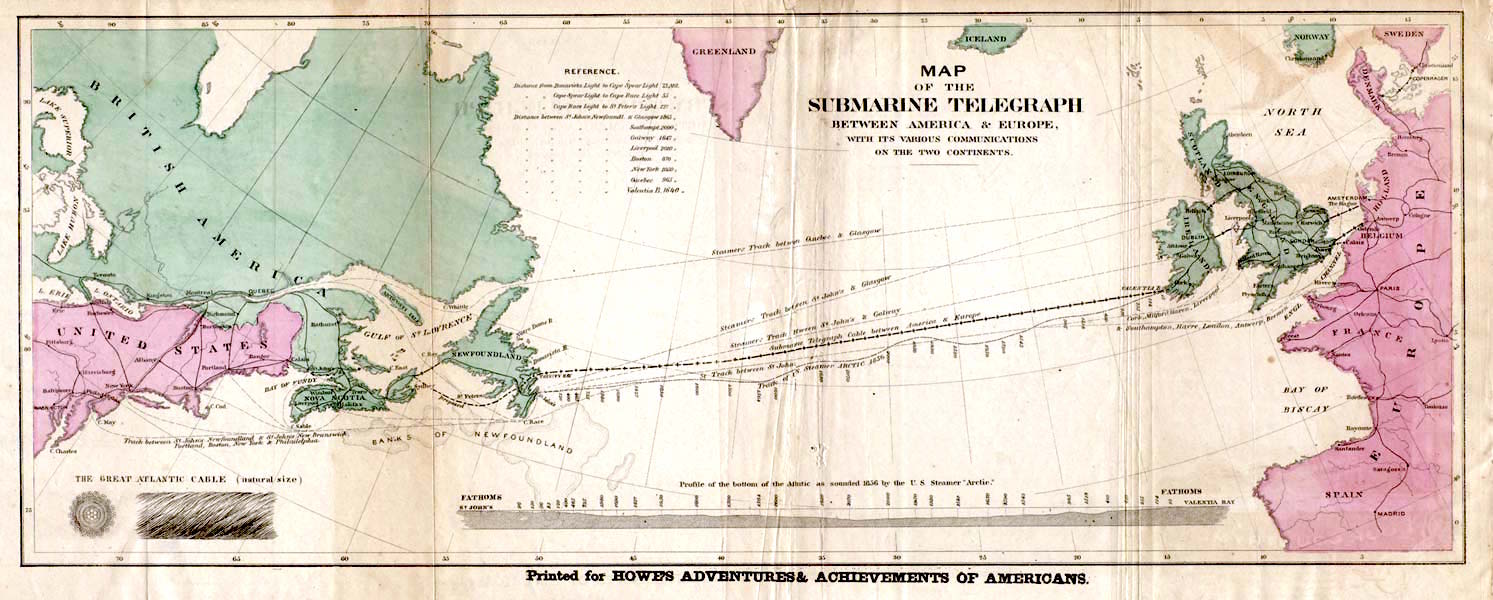 Transatlantic telegraph cable, Image courtesy of Wikipedia
The Internet emerged in 1960s, as a successor of telephone networks. Telephone networks are significantly different from data exchange: they use constant bitrate (amount of exchanged information each second). There was a natural need to connect computers and terminals together. Bursty traffic was expected: user sends a command to a terminal, a silent period follows while waiting for response, then user gets the results.
Three research groups developed packet switching approaches independently: Leonard Kleinrock, a graduate student at MIT (USA); Paul Baran at the Rand institute (USA); Donal Davies and Roger Scantlbury in the National Physical Laboratory (England).
ARPANet - the first packet-switched data network
J.C.R. Licklider and Lawrence Roberts started a project at the Advanced Research Projects Agency (ARPA). USA launched ARPA as a response to Soviet Sputnik program in 1958. It initially focused on satellites, and then moved on to computer communication. In 1967, Licklider and Roberts described plan for the ARPANet, and in 1969 they built the first network at UCLA with one packet switch. Shortly thereafter 3 switches were installed at the Stanford Research Institute (SRI), UC Santa Barbara, and the University of Utah.
The network interface, called IMP, was a separate box, size of a normal closet. Here you see Leonard Kleinrock standing besides one of the first IMP packet switches:
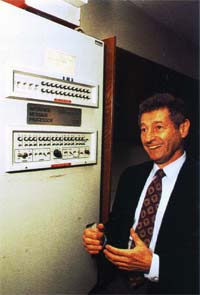 Leonard Kleinrock and IMP packet switch, image courtesy of Computer Hope
Fun fact: the first communication between the two ARPANet nodes (UCLA and SRI) crashed after transmission of the first three bytes: "log". The plan was to send command "login" from a remote terminal.
Growth of ARPANet: 1969: 4 nodes, 1970: 9 nodes, 1971: 18 nodes, 1975: 57 nodes, 1981: 213 nodes.
Norway was the first non-English speaking to join ARPANet in 1973 by a trans-atlantic satellite link between Norwegian Seismic Array (NORSAR) at Kjeller (near Oslo) and Seismic Data Analysis Center (SDAC) in Virginia.
The Inter-networking initiative
Around that time several parallel networks evolved, ALOHANet in Hawaii among others. Each of them had proprieatary protocols. A need to interconnect the many networks together arised. A common protocol was needed to serve as a common language of communication. Vinton Cerf and Robert Kahn, part of DARPA project, created the Internet in 1974. The project developed a common protocol to be used. As long as a network supported it, it could be connected to the global network of networks. The first protocol was Transport Control Protocol (TCP). IP was later separated as a protocol, and UDP was developed in 1980. In 1983 TCP became a standard, and it is still used today.
In 1988: CERN is the first European institution to join the Internet (Geneva, France).
Internet explosion caused by the Web
In early days the Internet was used mainly by academic institutions, businesses and households saw little value in it. It all changed in early 1980s when Tim Berners-Lee at CERN invented the Web with implementation of four important blocks: HTTP protocol, HTML document format, web server and a browser. In 1993: there are ~200 web servers in operation. Several researchers develop browsers with GUI. In 1995, students use Web with GUI and e-commerce websites emerge. By 2000 many companies support 4 internet killer-apps: Email, Web, Instant messaging, and MP3 Peer-to-peer sharing.
Recent trends
The Internet is a global network. Recent activity evolve around the idea "Connectivity for everyone, everywhere and all the time". Some of the initiatives:
- Google Loon project: provide Internet access everywhere by baloons traveling in the stratosphere
- High-speed home and office connections using fiber optics
- High-speed mobile networks: (currently 4G)
- EU Directives for roaming policies - make it possible to use mobile Internet abroad without extra charge
- Internet of Things (IoT): make every device smart by connecting it to cloud services
Further reading
Structure of the Internet
Internet building blocks
There are three basic building blocks for the Internet. End devices or clients, wired and wireless links and routers. The end devices are connected together through links, where the routers act as traffic lights and tell them where to send the information.
In summary you basically have a wire where you can connect your computing devices through routers and get connected to a network to send and receive information. It will send you to the Internet Service Provider(ISP). The ISP will then again send you to your desired web server that gives you the information you requested.
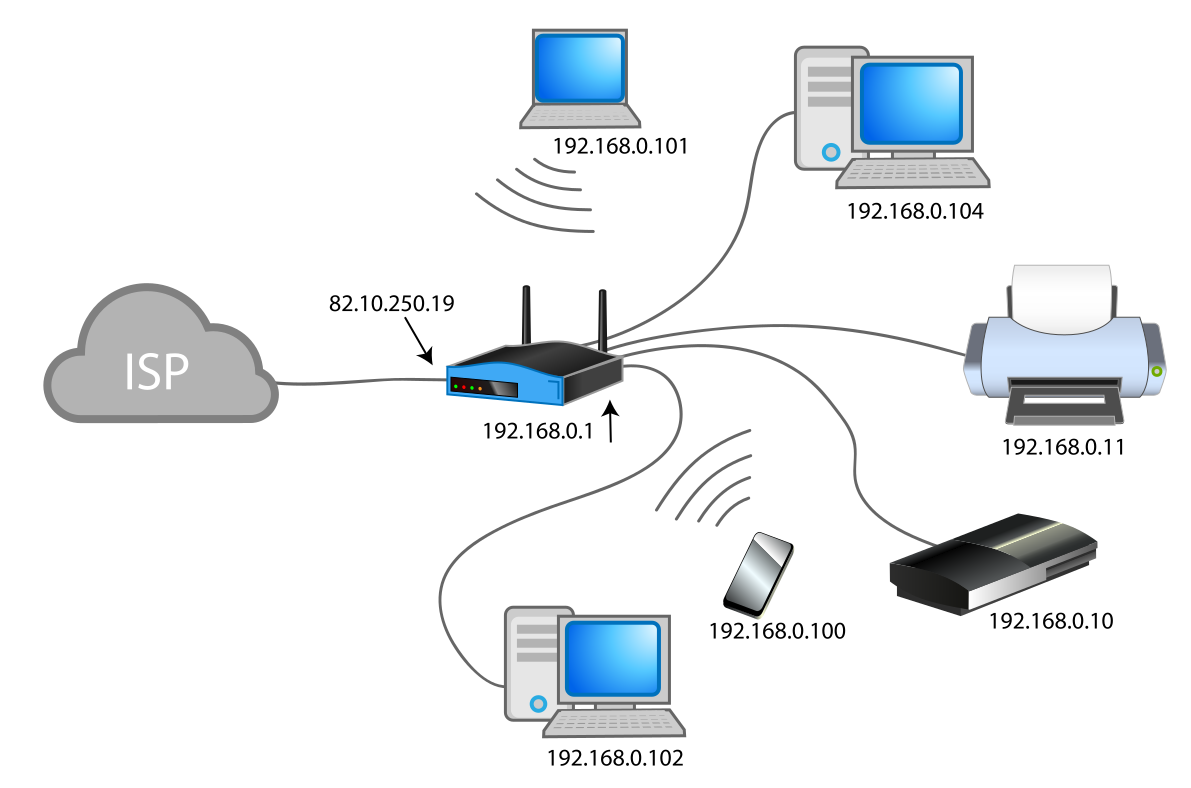 Picture of ISP connecting to router and then to end devices.
Source: "Computer Networking - A Top-Down Approach" By James F. Kurose and Keith W. Ross. Chapter 1.1
Protocols and services
A protocol defines the format and the order of messages exchanged between two or more communicating entities, as well as the actions taken on the transmission and/or reciept of a message or other event.
This means a protocol is a rule of which how information is delivered from one side, and accepted on the other. It defines how information will be handled between them, if it needs to be forwarded, kept or return a different piece of information.
Services from the application layer such as sending and recieveing emails through SMTP (Simple Mail Transfer Protocol), sending pictures and using programs are made possible by all the protocols in the different layers
A typical example to introduce proticols is human interaction. The «Language protocol». First, to communicate with another human you both need to speak the same language. If you both share the same ‘language protocol’, communication between you are enabled, just as with computers and devices.

When someone asks you the time, they send you a piece of information, with a simple request. You could point out he should have properly introduced himself before asking you for the time, you could also ignore the man or simply give the time. This depends on what personality you have, or in a computerworld; ‘’What kind of system you are’’.
If you can ping a host through the internet protocol, and ask for the current time, if the end system is programed to give you the time if someone asks it, it will give you the time! But you needed to run on the same protocols for it to work. A lot of different protocols run simultaneously whitout you even noticing. Well, they are not ‘’visible’’ to us anyway, they are just rules to how computers and devices work!
ISO-OSI and TCP/IP Network protocol stack
The Organization for Standardization(ISO) - Open System Interconnection(OSI) model is a seven-layer architecture. It defines seven layers in a complete communication system. The layers are from the top: application, presentation, session, transport, network, link and physical layer.
TCP/IP Network protocol stack uses only five of the layers: application, transport, network, link and physical layer. The layers is there to makes it easier to maintain and change the different protocols. The TCP/IP Network protocol provides end-to-end data communication specifying how data should be packetized, addressed, transmitted, routed, and received.
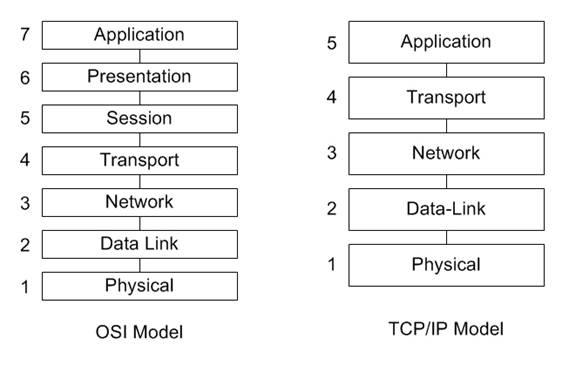 "Source:http://www.tamos.net/~rhay/overhead/ip-packet-overhead.htm"
Layer 1. The Physical layer: It is the lowest layer of the TCP/IP Network protocol stack. It transmits bits in the physical connection.
Layer 2. Data link layer: Link layer connects upper-layer processes to the physical layer. It places data on and receives data from the network. Data packets are framed and addressed by this layer.
Layer 3. The Network Layer: The Network layer is responsible for moving network layer packets datagram from one host to another. Main function of net layer is routing in a multi-hop network and addressing.
Layer 4. Transport Layer: Functions such as multiplexing, segmenting or splitting on the data are done by this layer.
Layer 5. Application Layer: It is the topmost layer. Transferring of files and presenting the results to the user is also done in this layer. Mail services, directory services, network resource are services provided by application layer.
Sources:
- "Computer Networking - A Top-Down Approach" By James F. Kurose and Keith W. Ross. Chapter 1.5"
- Wikipedia, Internet Protocol Suite
Internet service provider
Internet Service Providers (ISPs) are companies who connects private homes, enterprises and offices to the Internet. These services include, but is not limited to:
- Broadband rent
- Physical infrastructure construction, like fiber
- Server-services, like storage, domains and e-mail
In fact, the internet is just thousands of ISPs who handles billions of customers with internet devices, like computers, servers and mobiles.
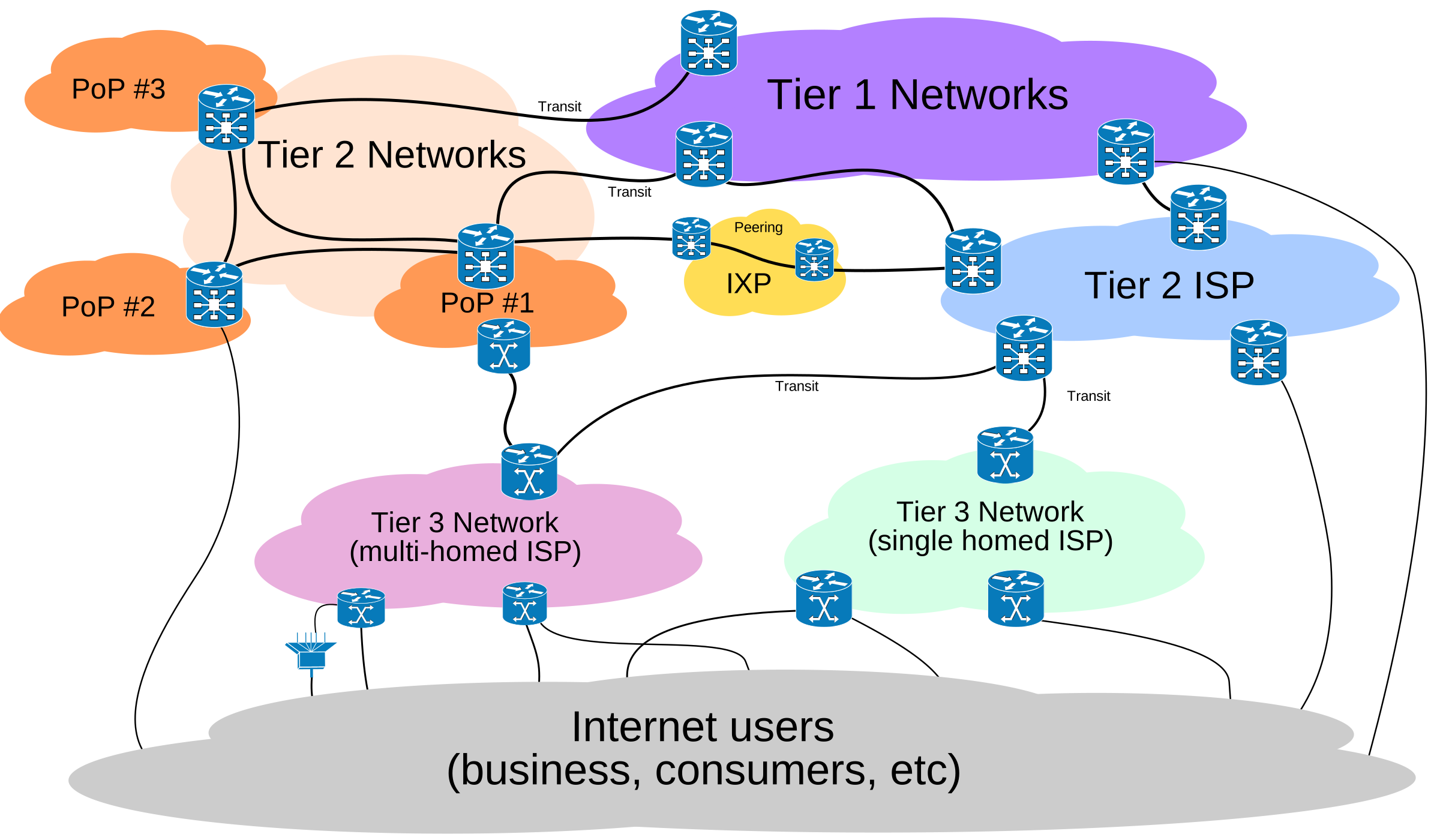
ISPs can be splitted in 3 Tiers: Tier 1, 2 and 3. Tier 1 is the global servers, who handles traffic from a Tier 2 ISP to another. Tier 2 is national or regional ISPs, who passes traffic from and to Tier 3, who is local ISPs. ISPs can further create accesspoints Point-Of-Presence (POPs).
ISPs can be in various forms like private-owned, community-owned, non-profit or commercials. They also comes in all sizes, from global to smaller communitys. Tafjord Kraft (Norwegian company), can with their 15000 fiber-customers be called a local or regional ISP.
Sources:
- "Computer Networking - A Top-Down Approach" By James F. Kurose and Keith W. Ross. Chapter 1.3
Access networks
An access network is a type of telecommunications network that connects users (subscribers) to their service providers through a wire. ( e.g. a copper telephone wire)
The home’s DSL (Digital Subscriber Line) modem decodes and translates digital input data to a high frequency tone for transmission through the telephone wires. The high frequency tones are sendt to the service provider, to exchange data back and fourth with its digital subscriber line access multiplexer (DSLAM).
Think of it as the service providers «special router», whitch trades back and fourth your information. The benefit of high frequency tone transmission gave the possibility for frequency-division multiplexing, where one could send a high-speed signals of frequencies for a downstream channel from 50kHz to 1MHz, a medium-speed upstream channel in the 4kHz to 50kHz band and an ordinary two-way tekephone channel, in the 0 to 4 kHz band.
This approach makes the single DSL link appear as if there were three separate links, so that a telephone call and and internet connection can share DSL link and operate at the same time.
For local access networks we either use Ethernet, with cable, or wireless, with radio frequencies, to connect to the network with.
 Internet Service providers connecting homes to the internet.
Examples of popular access networks:
- DSL
- Fiber
- Ethernet (for enterprises)
- TV cable use for internet
Source:
- "Computer Networking - A Top-Down Approach" By James F. Kurose and Keith W. Ross. Chapter 1.2
Circuit switching VS packet switching
Accessing internet requires messages sent to and from your PC to destination. One way to handle the connection is to create a physical line between you and the other end device. This secures you full bandwith and best speed. This is called circuit switching.
The problem is when several users wants to use the same line, at the same time. Then you need packet switching. Instead of a physical line, you seperate the data in smaller encapsulated packets. These packets takes much less time to get through the network than a big data file, so you can send packets from several users each second. The result is everyone can get access at the same time. This can be compared to the mailman who delivers thousands of packets to thousand different users each day, instead of hundreds of packets to a single person once a year. It's a way more flexible solution.
Today circuit switching is something for the past, and everything is based on packets, at least in communication and web. A few exceptions is some offline device communication systems, like ModBus RTU etc.
Physical layer
Physical media
The physical layer handles the transport of data. Today we have multiple options to what physical medium we will be using. Some of our main physical mediums are coaxial cable, twisted pair, wireless and fiber.
Coaxial cables
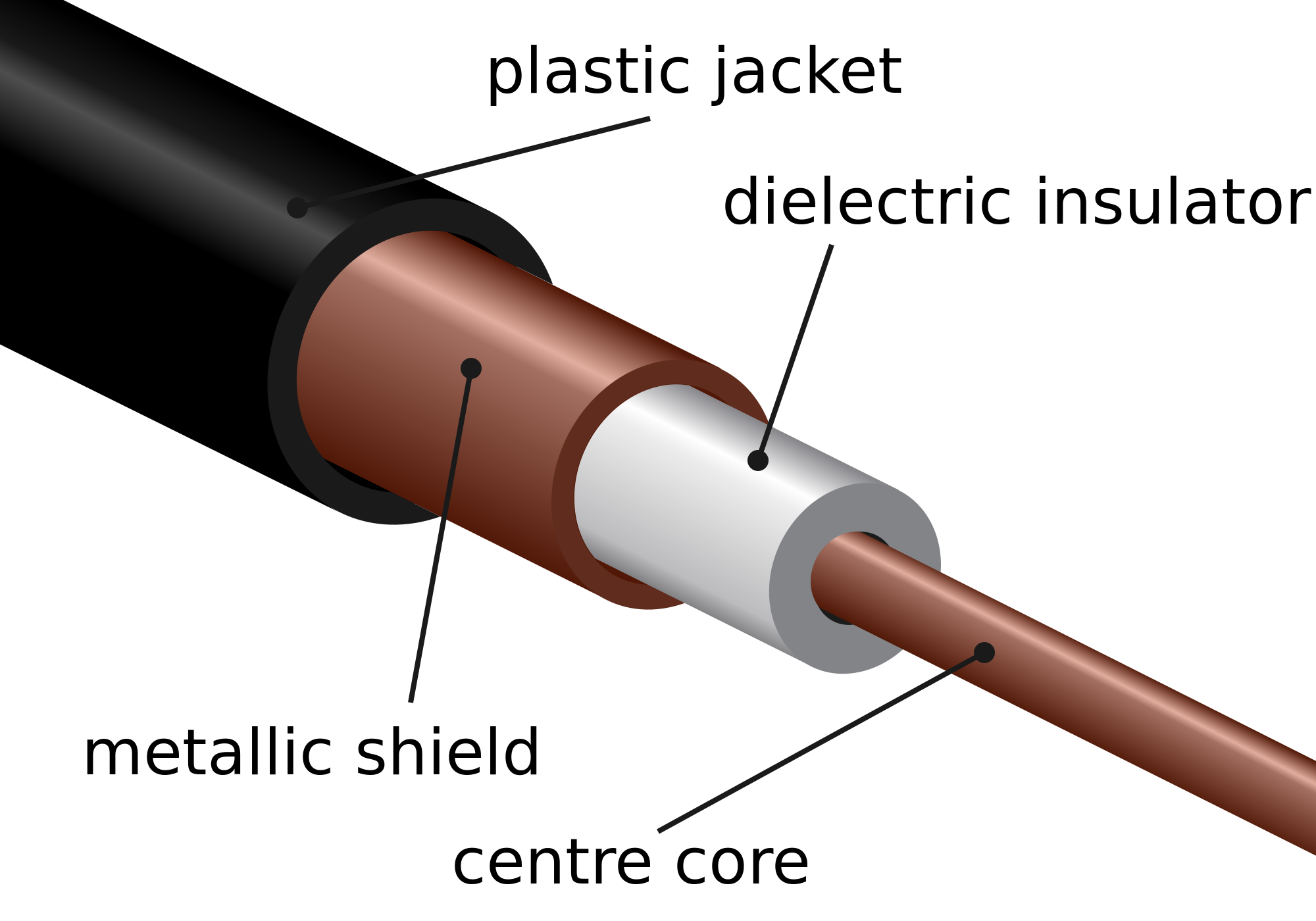
The coaxial cabel is a cable which is used to transfer alternating currents signals with a high frequency.
 "Source: Coax cable, Image courtesy of Wikipedia"
What differs coaxial cables from other shielded cables is that the coax cable has a precise round form, which results in a constant conductor spacing. This also provides protection from external electromagnetic interference. This is important as the signal running through the cable is often weak and therefore easily altered by interference.
Coaxial cables are still used today in a wide variety of applications. It can be used as a guided shared medium, this means it can serve multiple users at the same time. In cable television and cable internet access, the transmitter shifts the digital signal to a specific frequency band, and the resulting analog signal sent form the transmitter to one or more receivers.
Source:
Twisted pair cables
 "https://thumb1.shutterstock.com/display_pic_with_logo/3968318/406533088/stock-vector-twisted-pair-cable-with-symbols-foil-shielded-cable-406533088.jpg"
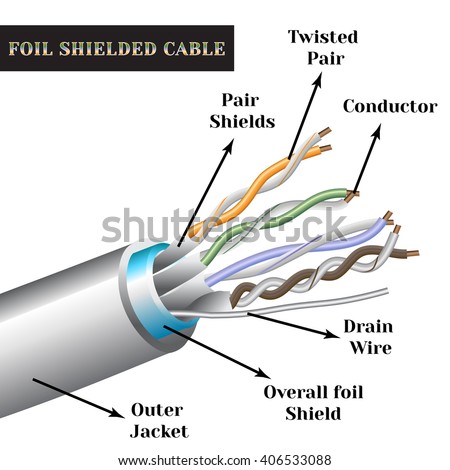
The least expensive and most commonly used guided transmission medium is twisted-pair copper wire. It has been used by telephone networks for over a hundred years. The wired connections from the telephone handset to the local telephone switch use twisted-pair copper wire in more than 99 percent of the cases.
Twisted-pair (arranged in a spiral pattern) consists of two insulated copper wires, each about 1mm thick. By twisting the wires, we reduce the electrical interference from external sources like electromagnetic radiation from unshielded twisted pair (UTP) cables, and crosstalk between neighboring pairs. Usually, a number of pairs are bundled together in a cable by wrapping the pairs in a protective shield. A wire pair consitutes a single communication link.
Unshielded twisted pair (UTP) is widely used for computer networks within a building (LAN). Data rates for LANs using twisted pair today range from 10 Mbps to 10 Gbps. The thickness of the wire and the distance between transmitter and receiver is what the data rates that can be achieved depend on.
In the 1980s when fiber-optic technology emerged, many people dismissed the twisted pair because of its relatively low bit rates. CAT 6a, the modern twisted-pair technology cable can achieve data rates of 10 Gbps for distances up to a hundred meters. Twisted pair has because of this technology and the low price producing and installing the cable, become the dominant solution for high-speed LAN networking.
Sources:
- "Computer Networking - A Top-Down Approach" By James F. Kurose and Keith W. Ross Chapter 1, page 47-48
Fiber optics
An optical fiber is a thin, flexible medium that conducts pulses of light with each flash representing a bit. The optical fiber can transfer data up to hundreds of gigabits per second. Since optical fiber has a core of glass and uses light pulses to transfer data, it is immune to electromagnetic interference, and has very low signal attenuation up to 100 kilometers. These characteristics have made optical fiber the most preferred media over long distances.
There are two types of optical cables used for data transfer, multi-mode optical fiber and single-mode optical fiber.  "https://upload.wikimedia.org/wikipedia/commons/7/7d/Singlemode_fibre_structure.png"
The multi-mode optical fiber operates with two types, the difference between them are the diameter of the core, either 50 micrometers or 62,5 micrometers, The core is then so "big" that the lightwaves can take different routes through the fiber.
The single-mode optical fiber has a core with a diameter less than 9 micrometers. The difference between single-mode and multi-mode is that single-mode sends one lightwave wich then does not have the posibilty to "mix" with other lightwaves, like the multi-mode.
 "https://upload.wikimedia.org/wikipedia/commons/thumb/0/0e/Optical_fiber_types.svg/1024px-Optical_fiber_types.svg.png"
Depending on the core and bandwith of the internett the multi-mode can transfer data up to 10 Gb/s at a max distance of 300m, compared to the single-mode that can transfer at the same speed with a max distance of 10km.
In fiber optics there is a technology called wavelength-division multiplexing(WDM), which multiplexes a number of signals onto a single optical fiber, by using different wavelenghts(colors) of laser light. This technique enables bidirectional communication over one optical fiber.
Sources:
- "Computer Networking - A Top-Down Approach" By James F. Kurose and Keith W. Ross Chapter 1, page 48
- Wikipedia, Optical fiber
- Wikipedia, Wavelength-division multiplexing
Wireless Media
Wireless communication transfers information or power between multiple points that are not connected by cables. Usually, radio waves are used to implement and administer wireless telecommunications networks. This takes place at the physical layer of the Open Systems Interconnection model (OSI-model). With radio waves distances can be short - a few meters for bluetooth- or as far as millions of kilometers for deep-space radio communications.

Wireless local area networks (WLAN), cellphone networks, satellite communication networks, and terrestrial microwave networks are examples of wireless networks. You can read more about Wireless Networks in Chapter 20.
Radio and Spread Spectrum Technologies – Wireless local area networks use a high-frequency radio technology similar to digital cellular and a low-frequency radio technology. The IEEE802.11 standard defines the open-standards wireless radio-wave technology, also known as Wifi. Wireless LANs use spread spectrum technology to enable communication between multiple devices in a limited area.
Cellular and PCS - Cellular and PCS systems use multiple radio communications technologies. The systems divide the area covered into multiple geographic areas. Each area has a low-power transmitter or radio relay antenna device to relay calls from one area to the next area.
Satellite Communication - Satellites communicate via microwave radio waves. The satellites are stationed in space, in geosynchronous orbit ~35,400 kilometers above the equator. These Earth-orbiting systems are capable of receiving and relaying data, voice, and TV signals.
Terrestrial Microwave - Terrestrial microwave communication uses Earth-based transmitters and receivers which looks like satellite dishes. Terrestrial microwaves use a low gigahertz range, which limits all communications to LOS (line-of-sight). Relay stations are usually around 48 kilometers apart.
Sources:
- "Computer Networking - A Top-Down Approach" By James F. Kurose and Keith W. Ross Chapter 1, page 44-46
- Wikipedia, Wireless
- Wikipedia, Wireless network
Cellular network media

A cellular network or mobile network is a radio network distributed over land areas called cells, each served by at least one fixed-location transceiver, known as a cell site or base station. Unlike WiFi, in a cellular network a user only needs to be within a few kilometers – as opposed to a few meters (usually) – of the base station. This is because it uses much higher transmission power and lower frequencies. Although, if you would use the same power in Wifi as in cellular base stations and mobile phones, you could potentially achieve kilometres of range. In a cellular network, each cell characteristically uses a different set of radio frequencies from all their immediate neighbouring cells to avoid any interference.
These cells provide radio coverage over a wide geographic area when joined together, which enables a large number of portable transceivers to communicate with each other, via base stations, even if some of the transceivers are moving through multiple cells during transmission.
Telecommunications companies have made big investments in the 3G, and now 4G system, which provides packet-switching wide-area wireless internet access. This can potentially achieve a speeds up to 100 Mbp/s for high mobility communication (trains, cars, etc.) and 1 Gbp/s for low mobility communication (pedestrians and stationary users).
You can read more about Cellular Networks in Chapter 22.
Sources: 1. "Computer Networking - A Top-Down Approach" By James F. Kurose and Keith W. Ross Chapter 1, page 46 2. Wikipedia, Cellular network
Modulation
Modulation of a signal is the process of combining two different signals into one, in a way that the signal can be separated at a later moment. One of the signals is a periodic waveform called carrier signal, the information signal containing the data the modulates the carrier signal. There are multiple ways to modulate a signal, which we will go into detail later on.
Amplitude modulation
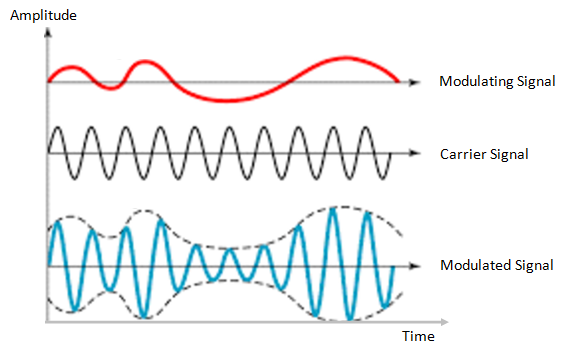
Amplitude modulation is a technique used in electric communication for transmitting data over radio carrier waves. Amplitude modulation is varying the signal strength (known as amplitude) of a carrier wave to match the form of the signal wave being transmitted.
 (Image source: https://electronicspost.com/wp-content/uploads/2015/11/amplitude-modulation1.png)
The waveform of the signal wave, will decide the amplitude of the carrier wave. The carrier wave will stay the same in terms of frequency, but the signal wave determines the top and bottom (known as envelope) of the carrier wave’s amplitude. The top amplitude of the carrier wave will match the signal wave, while the bottom amplitude will be a mirror of the signal wave. (see image above)
The greatest advantages of amplitude modulation is that it can travel longer distances, and it has a simple circuit and therefore is low cost to create.
The greatest disadvantage of amplitude modulations is its vulnerability to noise and its high power consumption.
Today, Amplitude modulation is generally only used in amateur radio (AM radio), and by the navy for long distance communication.
Sources:
Frequency modulation
Frequency modulation is a technique used in electric communication for transmitting data over carrier waves. Frequency modulation is varying the signal frequency of a carrier wave to match the form of a signal wave.
 (Image source: http://images.tutorcircle.com/cms/images/83/frequency-modulation.png)
The waveform of the signal wave will decide the instantaneous frequency of the carrier wave. When the amplitude of the waveform increases, the frequency of the carrier wave decreases, and when the amplitude of the waveform decreases the frequency of the carrier wave increases.
It is also possible to encode digital data via FM. When transmitting digital data, a predefined frequency will decide whether the carrier wave represents a one or a zero. For example, the carrier wave could be modified to one frequency to represent a 0, and another frequency to represent a 1. This technique of specifying values for frequency is known as Frequency key shifting, FSK for short.
The greatest advantage of frequency modulation is its resilience to noise. Because it’s the frequency of the carrier wave that is being modulated, the amplitude of the signal can change without interfering the value of the carrier wave. This means the signal value will stay the same as long as the signal is strong enough to read.
The greatest disadvantage of frequency modulation is its lower bandwidth speed, compared to other modulation formats.
Frequency modulation is mostly used in radio broadcasting and radiocommunication.
Sources:
Phase modulation
Phase modulation is a modulation technique where information is encoded as variations in the instantaneous phase of a carrier wave. The carrier wave (alternating current), will oscillate (swing up and down) in a continuous matter. The carrier wave will then be modified by a signal wave, which will vary its phase. When the signal wave has an instantaneous positive amplitude the phase carrier wave will change in one direction, and if the signal has negative amplitude the carrier changes to the other direction. The carrier wave will still keep its peak amplitude and frequency.
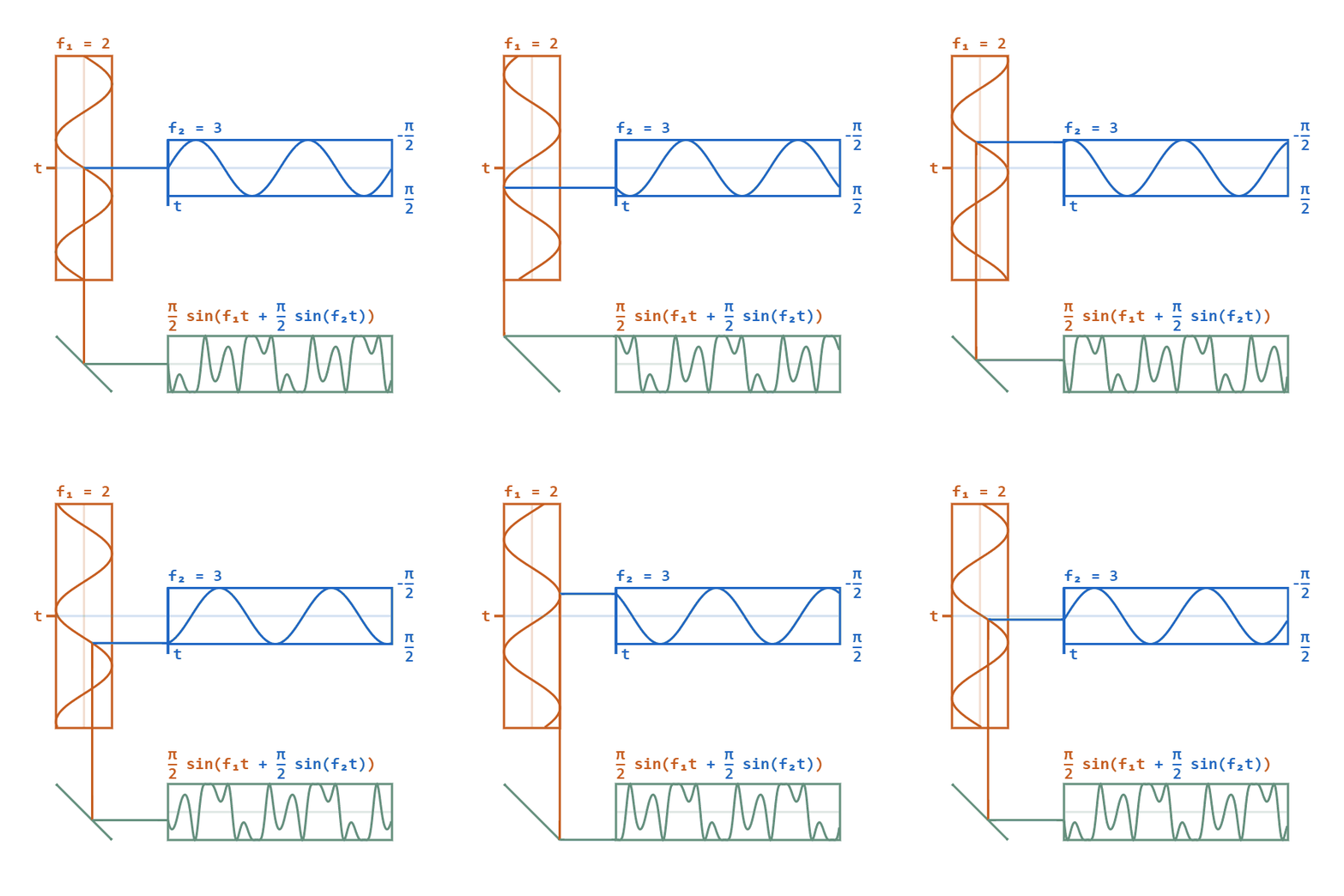 (Image source: https://upload.wikimedia.org/wikipedia/commons/a/ae/Phase-modulation.gif)
F1 shows the carrier wave. F2 is the signal wave which modulates the carrier wave to give the bottom result.
When phase modulation is used for digital signals, the carrier phase will shift abruptly instead of continuously whenever the signal changes value. Each shift from one state to another will then represent a specific digital input data state. Typically, a power of 2 is used for digital phase modulation. A binary digital phase modulation (2 state signal) is called a biphasemodulation, but more advanced modes can have 4, 8 or even more states.
 (Image source: https://i1.wp.com/scientists4wiredtech.com/wp-content/uploads/2017/04/mod-5-psk.gif?fit=740%2C740)
Phase modulation is used for transmitting radio waves, and is also an important part of digital transmission schemes like Wi-Fi and GSM.
Sources:
Frequency VS time multiplexing
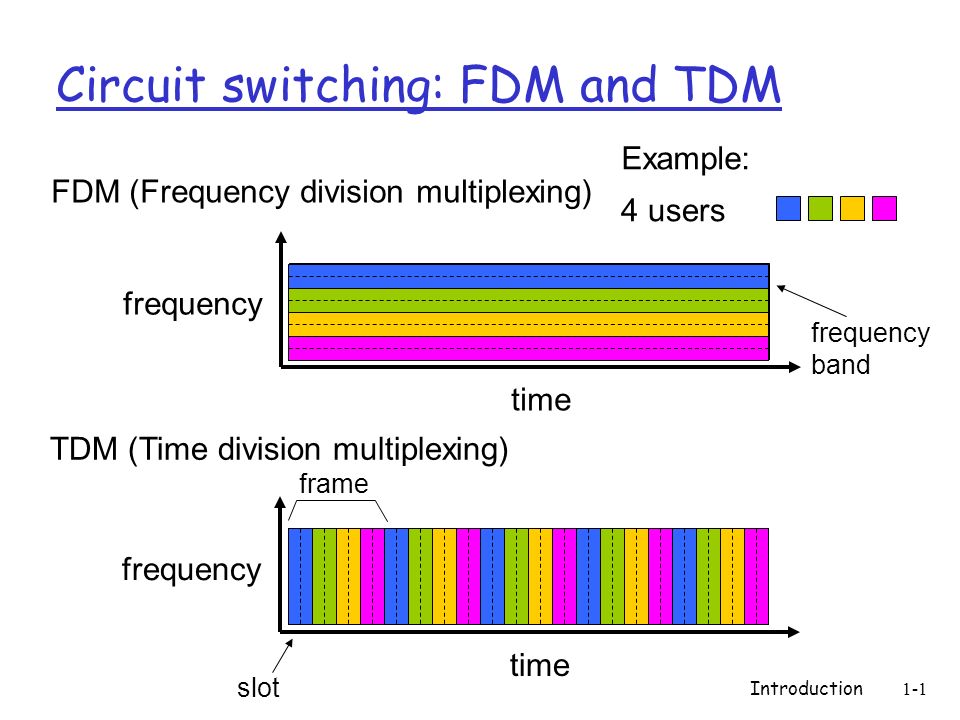
Multiplexing is the process of combining multiple signals into one, in a way that each individual signal can be retrieved at the destination. This is done with either frequency-division multiplexing (FDM) or time-division multiplexing (TDM).
The main difference between TDM and FDM is how they divide the channel. TDM divides and allocates certain time periods to each channel, while FDM divides the channel into two or more frequency ranges that do not overlap. With this, we can say that for TDM, each signal uses all of the bandwidth some of the time, while for FDM, each signal uses a small part of the bandwidth all of the time.
FM radio stations uses FDM to share the frequency spectrum, and each radio station uses a specific radio band between 88MHz and 108 MHz.
In TDM the link is divided in to time frames with a fixed duration. The time frames are then divided into several time slots. When the network establishes a connection to a link, the network dedicates these time slots in every frame to this specific connection. Which means that the time slot for sub-channel 1 is transmitted during slot 1 and sub-channel 2 is transmitted during slot 2 etc. When the last time slot of the time frame has been transmitted the cycle start over again at slot 1.
Sources:
- "Computer Networking - A Top-Down Approach" By James F. Kurose and Keith W. Ross Chapter 1, page 56-58
- Wikipedia, Frequency-division multiplexing
- Wikipedia, Frequency-division multiplexing
Channel capacity: Shannon-Hartley theorem, bandwidth
Bandwidth is the maximum transfer rate of a network cable or device. It measures how fast data can be sent over a wired or wireless connetcion. The Shannon-Hartley theorem tells the maximum rate at which information can be transmitted over a communications channel of a specified bandwidth in the presence of noise. Based on this theorem we can calculate the channel capacity of a medium, and the maximum amount of error-free information per time unit, assuming that the power is bounded, and that the Gaussian noise process is characterized by a known power or power spectral density.
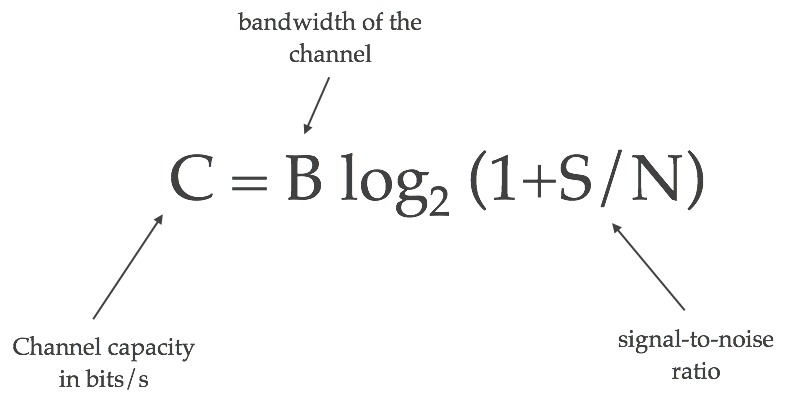 "Source: https://kiranbot.com/images/wifi/shannon-hartley.png"
C is channel capacity in bit per seconds.
B is bandwidth of the channel hertz.
S is the average received signal over the bandwidth, measured in watts or volts squared.
N is the average power of noise and interference over the bandwith.
S/N is the signal-to-noise ration (SNR) or carrier-to-noise ratio (CNR).
Different strength, frequency and noise will affect the achieved bandwidth. A good example is Ethernet cable. The cable is divided into different classes according to speed where CAT6a is the fastest and most common. The higher the class the more shielding is used to prevent noise from interfering with the signal. As we get less noise, we get a higher channel capacity with the maximum amount of error-free information per time unit.
Sources:
Packet transmission
Routing and forwarding
When connecting one client to another, the network must find an efficient path between the clients. Finding this path is called routing. [1] Routing must be done in all networks, from mail to the internet. An early example of routing is the telephone line operators connecting telephones together physically by cable. In order to find the most efficient path between two nodes, a routing table, or algorithm is used. For smaller networks a table can be feasible, but for larger ones like the internet, routing algorithms such as Link-State Algorithms are implemented.
Packet forwarding is the processes of relaying packets from one intermediate node in a network to the next. There are several ways to forward packets. For internet traffic, (and for the example with the telephone line operator), unicast is used. Unicast means that each node is relayed to only one intermediate node, until it reaches its recipient, as shown in the figure below. In order to facilitate efficient forwarding, forwarding tables are implemented.
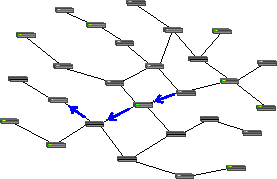 https://commons.wikimedia.org/wiki/File:Unicast_forwarding.png
This is opposed to multicasting, where the packet will be relayed to several nodes and clients, and all of them are able to see the packet. [2]
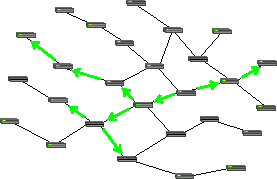 https://commons.wikimedia.org/wiki/File:Multicast_forwarding.png
A forwarding table is a table where an IP adress is looked up, and a port leading towards the recipient is returned. [4]
Sources:
[1] James F. Kurose, Keith W. Ross, "Computer Networking - a topdown approach", sixth edition, Chapter 1.4.
[2] https://en.wikipedia.org/wiki/Routing
[3] https://en.wikipedia.org/wiki/Packet_forwarding
[4] https://en.wikipedia.org/wiki/Forwarding_information_base
Queues
A router needs a way to handle more than one packet at a time. If packet B arrives to the router before packet A is fully transmitted, packet B will be added to the router's output-queue. Most routers have multiple queues; both hardware queues and software queues.The hardware queues use the principle “first in – first out” (FIFO) when handling their queue, which means that the first package in the queue will be sent first and so on. To be able to send packets according to their priority, a router can use different software queues to organize the packets [2].
The queue of a router will have a given buffer, which is how much data the queue can hold. When the buffer is full, the router will just discard new incoming packages [1].
 http://www.h3c.com.hk/res/201211/14/20121114_1452350_image009_761618_1285_0.png
Sources:
[1] James F. Kurose, Keith W. Ross, "Computer Networking - a topdown approach", sixth edition, Chapter 1.4.
[2] http://www.routeralley.com/guides/qos_queuing.pdf
Transmission time calculation
The time it takes from a packet or even a bit leaves a server or a client until arrives at its destination depends on a number of factors. These factors are called processing, queuing, transmission and propagation.
The processing delay is basically the time it takes for the router to check the packets header in order to find out which direction to send the packet. Another factor could also be to check for bit-level errors in the packet that could have occured when the packet was tranmitted from the previous node. The processing delay is usually in the microseconds order.
The queuing delay only depends on the queue coming in to the router. If there is no queue the queuing delay will be zero. On the other hand, if the traffic into the router approaches its maximum capacity the queuing delay will approach infinity. The queuing delay is a difficult factor to predict and is therefore not included in the transmission time calculation.
The transmission delay is the time it takes the router to push the entire packet out from the router. This makes the transmission delay a function of the packet size and the transmission rate of the link. This is not be confused with the propagation delay, so make sure you understand the difference.
The propagation delay is the time i takes for a single bit to travel from one router to the next. Here, we only consider the time it takes for the bit to travel between the routers, nothing else. You could concider it to be the delay in the wire itself. In wide area networks the delay can be a few microseconds. In local area networks it is concidered to be negligible.
Packet delays, congestion, packet loss
There are four kinds of packet delays; processing, queuing, transmission and propagation. These are explained above under "Transmission time calculation", and on this link[2] you can in short see details and calculations.
Congestion is when a network node receives more data than it can handle. As an effect we will experience queuing delay, packet loss or a blocking of new connections. A link/router has finite queue capacity. When congestion takes up all this capacity there will be no place in the queue for incoming packets, with packet loss as an result.
 http://www.geeksforgeeks.org/wp-content/uploads/gq/2015/12/Capture1.png
Illustration: Look at the bucket as a low capacity router in a network path. Outflow has a limited speed, and if inflow is greater - the water level will rise in the bucket, like in a queue to get out. If inflow continues to be greater the bucket will be full and water will be spilled, which in our network equals packet loss. This situation with a full bucket (router/network node) and to high inflow (incomming packets) is a congestion. (Picture shows one inflow, but remember that we may have many.)
Sources:
[1] James F. Kurose, Keith W. Ross, "Computer Networking - a topdown approach", seventh edition, Chapter 1.4
[2] http://www.ia.hiof.no/datane/utdelt1-6sept-2004.pdf
Bottleneck link
Consider sending a file from a server to a client. The client and server are connected by two communication links and a router. Let Rs denote the rate of the link between the router and the server, and Rc denote the rate of the link between the router and the client. If Rs < Rc, the bits will be forwarded from the router to the client at the rate of Rs bps. If Rs > Rc, the router will not manage to send bits forward as quickly as it receives them, and the stack of bits waiting to be sent from the server will grow. The slowest link in a network, such as in this example, is called a bottleneck link[1].
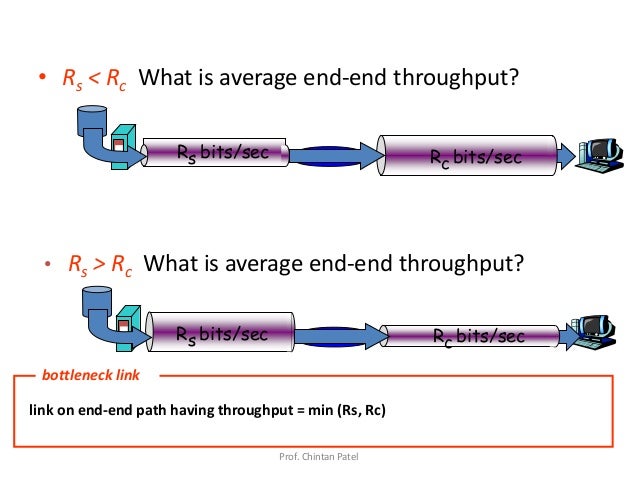 https://image.slidesharecdn.com/unit1-1introduction-150127231145-conversion-gate02/95/unit-1-1-introduction-60-638.jpg?cb=1422400408
Sources:
[1] James F. Kurose, Keith W. Ross, "Computer Networking - a topdown approach", sixth edition, Chapter 1.4.4.
Why 10Mbit is not 10Mbit
When transmitting data, every layer the data goes through will add a header to each data packet, similar to address on a letter. Transport layer adds an TCP header, network layer adds an IP header, and network interface layer adds an ethernet header. All of these headers occupies some of the capacity on the line, approximately 6% or more. In addition using TCP includes acknowledgements of the received packages being sent back, which will also occupy some of the bandwidth. Furthermore retransmission of packets can occur. As of such a user can experience that "10Mbit is not 10Mbit". Also keep in mind the principle of the bottleneck link.
Sources:
[1] Lecture slide 02-2-data transmission.
Application layer introduction
Application layer services
The top layer of both the OSI and TCP/IP model is called the Application Layer. It is the closest layer to the end user, providing an interface between the applications we use to communicate and the underlying network on which our messages are transported. Protocols from the layer is used to exchange data between programs running on the source and destination hosts, some well known protocols are HTTP, FTP and DNS. The application layer provides various services to the end user, with the help of several different protocols.
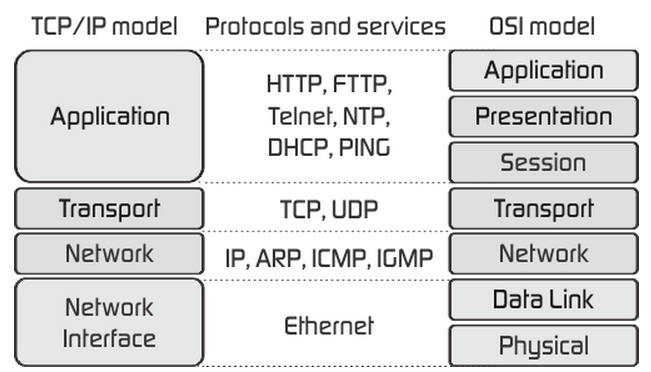 Image source: http://fiberbit.com.tw/tcpip-model-vs-osi-model/
Applications need different services, depending on their purpose. Your browser uses the HTTP-protocol in order to browse websites, while a file transfer application utilizes the FTP or TFTP protocol. See more examples below.
In the TCP/IP Model the application layer covers roughly the application, presentation and session layers of the OSI Model. Therefore the application layer is also responsible for presenting the data in the required format, which might include encryption and compression. In the OSI Model this is done by the presentation layer. The OSI Model's session layer manages and terminates sessions between two communicating hosts; this can be used for logging in on the client's software.
Sources:
-
Chapter 2, Computer Networking: A Top-Down Approach (7th Edition) by James Kurose (Author), Keith Ross (Author)
Client-server VS Peer-to-peer architectures
There are two main networking architectures for internet applications, client-server and peer-to-peer.
The client-server architecture makes use of servers that are always running, servers can get requests from several clients. Examples of client-server applications are e-mail and websites. If the client-server application is popular enough, there will be too many requests for one server to handle, which is why popular applications need a data centre containing several servers. This is an expensive approach since hosting servers isn't cheap, but necessary since an application of that size needs to be reliable.
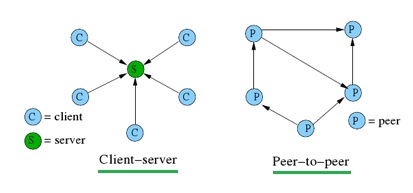 Image source: http://www.rfwireless-world.com/Terminology/Client-Server-Architecture.html
Peer-to-peer architecture does not rely on expensive servers to stay online, instead it uses direct communication between two connected hosts. The hosts (peers) are devices connected to the internet and are controlled by a user. There are some instances where peer-to-peer applications make use of servers, for example to track their users IP addresses. TeamViewer and Skype are examples of popular peer-to-peer applications that only use their servers for billing information and presence information. This architecture is heavily used for filesharing purposes, of which BitTorrent is one example. Peer-to-peer's decentralized structure are why is it so popular for these purposes, but such a structure presents challenges with reliability, security and performance. Skype decided to change to a client-server architecture because the increasing number of users and different types of devices made their peer-to-peer system unreliable and they experienced problems keeping up with demand.
Sources:
Peer-to-Peer vs. Client-Server
Networking Basics: Peer-to-peer vs. server-based networks
Networking: Peer-to-peer vs Client-server Architectures
Chapter 2, Computer Networking: A Top-Down Approach (7th Edition) by James Kurose (Author), Keith Ross (Author)
Socket introduction
A socket is one endpoint of a two-way communication link between two programs running on the network. A socket is bound to a port number so that the TCP layer can identify the application that data is destined to be sent to.[1]
If an IP-address is the address of your computer, a port will be a destination address to a specific service running on your machine. Using this principle an application can bind a socket to a specific port. Once a socket is created, an application can use that socket to send and receive data to and from another computer. In a client-server based communication model a socket on the server side will listen for incoming connection. The client must make a connectio